
PedCalc - Google Play
You'll be able to see results in few seconds.
Publisher Description

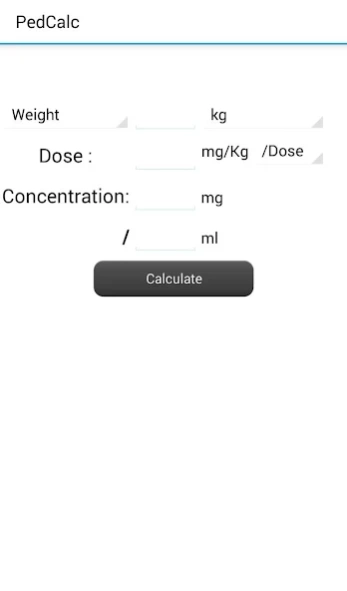
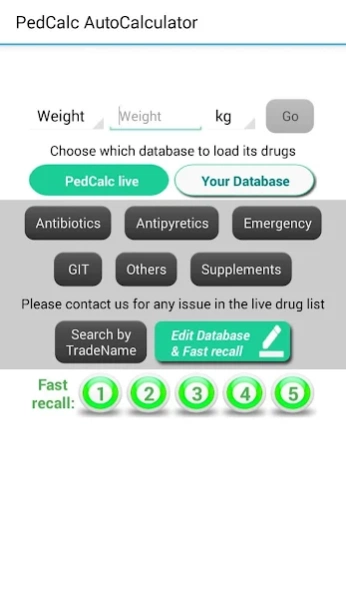
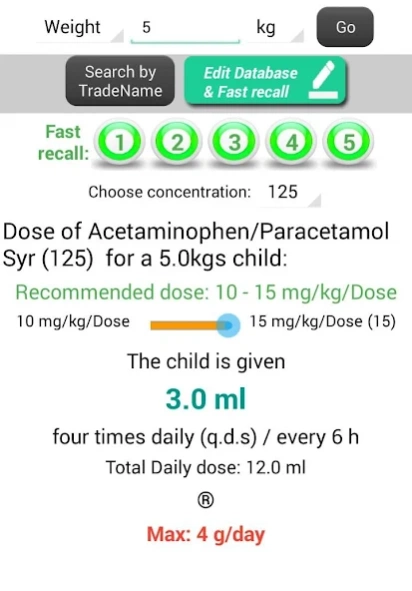
A handy calculator for various doses of drugs for pediatricians.
A handy calculator for various doses of drugs for pediatricians with a lot of abilities:
A) General Calculator with the user entering the 4 parameters of calculation
B) Auto Calculator with
* Calculate using either the child's weight or his age.
* Drug Group lists
* Fully customized lists for adding drugs of your own numbers & data
* Fast access buttons for frequently used drugs
* Each drug shows: Recommended dose /kg, Dose for the entered weight by ml, Hints about the drug, Warnings & Trade names.
* For drugs with a range of doses there is a slider to slide between high & low limits & in between
* Ability to Backup the customized drug database.
* Ability to share your customized database with others
This application is NOT intended to take clinical decissions for you. In clinical practice your knowledge comes first and you're the only one responsible for your decisions.
It's hard to make a database that suits all drug uses, different geographical perspectives & various medical schools. We'd be pleased to receive your feedback at pedcalcapp@gmail.com for suggestions, ideas, data corrections and bug reports. We'll use your feedback to construct a more efficient & complete drug database and a better application.
About PedCalc
The company that develops PedCalc is Shadi Aboelnaga. The latest version released by its developer is 1.0 .
To install PedCalc on your Android device, just click the green Continue To App button above to start the installation process. The app is listed on our website since 2017-08-10 and was downloaded 0 times. We have already checked if the download link is safe, however for your own protection we recommend that you scan the downloaded app with your antivirus. Your antivirus may detect the PedCalc as malware as malware if the download link to appinventor.ai_shadinaga.PedCalc is broken.
How to install PedCalc on your Android device:
- Click on the Continue To App button on our website. This will redirect you to Google Play.
- Once the PedCalc is shown in the Google Play listing of your Android device, you can start its download and installation. Tap on the Install button located below the search bar and to the right of the app icon.
- A pop-up window with the permissions required by PedCalc will be shown. Click on Accept to continue the process.
- PedCalc will be downloaded onto your device, displaying a progress. Once the download completes, the installation will start and you'll get a notification after the installation is finished.
Program Details
System requirements
Download information
Pricing
Version History
version
posted on 2017-08-10
>> Multi-language Support (English, Arabic, Portuguese, French).
>> Share your customized list with a colleague or get his.
>> ‘Updated Age-to-weight formula.
* Regularly updated live database for common drugs.
* Fully customized lists to keep your own drugs with your preferred values.
* Search by trade names.
* Fast recall buttons to immediately use a drug.
* Calculate using either the child's weight (kg, lbs) or his age (years, months).
version
posted on 2017-08-10
> > Multi-language Support (English, Arabic, Portuguese, French).
> > Share your customized list with a colleague or get his.
> > ‘Updated Age-to-weight formula.
* Regularly updated live database for common drugs.
* Fully customized lists to keep your own drugs with your preferred values.
* Search by trade names.
* Fast recall buttons to immediately use a drug.
* Calculate using either the child's weight (kg, lbs) or his age (years, months).
version 1.5
posted on 2014-08-04
* Calculate using either the child's weight or his age.,* Customized list for adding drugs of your own numbers & data,* Each drug shows: Recommended dose /kg, Dose for the entered weight by ml, Hints about it, Warnings & Trade names.,* For drugs with a range of doses there is a slider to slide between high & low limits,* Ability to Update Drug database without updating the installed program itself,* Ability to Share Your Customized list with a colleague or Get his (requires internet connection)
Disclaimer
Official Google Play Link
We do not host PedCalc on our servers. We did not scan it for viruses, adware, spyware or other type of malware. This app is hosted by Google and passed their terms and conditions to be listed there. We recommend caution when installing it.
The Google Play link for PedCalc is provided to you by apps112.com without any warranties, representations or guarantees of any kind, so access it at your own risk.
If you have questions regarding this particular app contact the publisher directly. For questions about the functionalities of apps112.com contact us.
